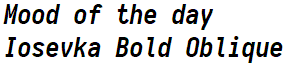
@Ronflaix I love this font but I find github baffling and opaque as to what I should be doing. I'm not sure how to pick the specific styling I want ;w;

@Nine Yyeah, there is this section there be5invis.github.io/Iosevka/#op and the Prebuilt package in the release page.

The -term- version is without programming ligatures for programs that doesn't support them.

But TBH it's still unclear. I wish they did a font selector like for Input ( input.fontbureau.com/download/ )

@Nine Those ligatures are custom ligatures designed to replace specific characters combinations like += or -> supposedly to improve source code reading

Using this diagram from the Fira Code font to show what changes when they're on. (Not all fonts have those custom ligatures nor this specific set)

Fira code : github.com/tonsky/FiraCode

@tom @Ronflaix Oh shit, that's... wow that's kinda cool. Though I suspect for my own readability when I'm coding (if I'm coding) I'll not want the ligatures so I know what I've typed ^^;; At least until I get good enough that I just... know. Y'know?

@Nine @Tom It's okay. I understand. To be honest I got used to it after a bit sometimes and it surprises my coworker to see magically a != turning instantly in a ≠ character.

@Ronflaix @Nine I wonder if I could inject the symbols needed for powerline into it bc it'd be an ideal terminal font...

@Tom Iosevka and Fira Code both already have Powerline characters.

@Ronflaix oh lmao I just saw them on the bottom of the picture... I'm a fool...

@Tom A simple warning : some terminal emulators handle ligatures pretty badly. You'd better go with a patched Fira Mono you could find here : github.com/powerline/fonts

Sign in to participate in the conversation
Computer Fairies

Computer Fairies is a Mastodon instance that aims to be as queer, friendly and furry as possible. We welcome all kinds of computer fairies!