
For the first time in what feels like forever, or at least since HP brought Compaq all those years ago, I found an HP laptop that did NOT need me to remove, buy, and replace the rubber foot strips in order to take it apart! An HP Laptop 15-fc0037.
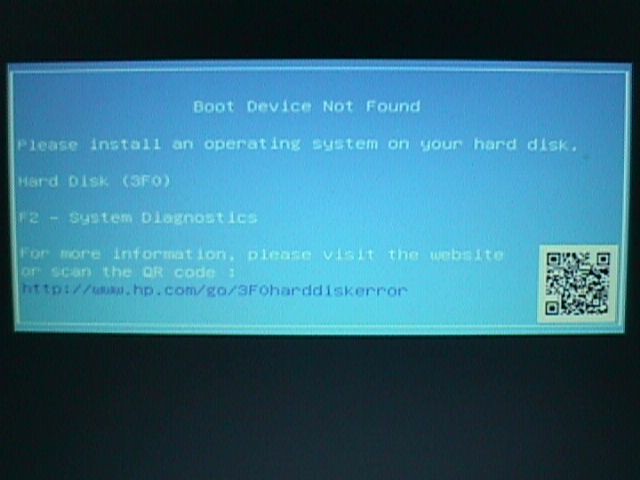
The bad news? It came to me because its SSD (M.2 NVMe) died so suddenly and so completely, out of warranty, that the firmware diagnostics said nothing was installed.
Periodic reminder: Make backups, check that your backups are actually what you think they are, and test your backups.
It's been about 15 years or so since Microsoft's first version of the Windows Media Creation Tool, and the latest version STILL needs to run while logged into an Administrator account, even when downloading and writing to a USB thumb drive.
"Run as Administrator" from a Standard User account STILL isn't good enough.
The Windows installer gives up without an error message, leading folks to conclude the replacement SSD or system board is a dud.
The only way I found this out was by installing a Windows 11 ISO on a thumb drive via Rufus on an absolutely bonkers lark. It edited the image to show critical messages Microsoft won't:
[INFO] Starting Microsoft Windows bootmgr...
[FAIL] Windows bootmgr encountered a security validation or internal error
I lost sleep over this message, yelling more than once at it, "What do you think I'm trying to do?," because the replacement SSD kept testing good in both an external receiver and the obstinate laptop.
All because Windows failed silently and HP didn't document.
In fact, what HP put at the other end of the error message URL (http://www.hp.com/go/3F0harddiskerror) is so sloppy, it has a mock-up screenshot of entirely the wrong error message at its head.
(Also kicking myself for forgetting about Secure Boot.)
I am finally rid of the easiest to access HP laptop yet to cross my desk, but HP charged me one last toll before letting me go.
The toll? Proof that Windows hardware support is still a sad joke, only barely hidden from users by hardware manufacturers.
Did you know that, as late as 3 years ago, HP sold wifi-only laptops whose wifi adapters are incompatible with every network driver on the Windows 11 installation media? That gets interesting when setup won't even start without the Internet.
By the way, the no-Internet Local Account trick of pressing Shift+F10 and typing:
OOBE\BYPASSNRO
in the Command Prompt window still works in the 25H2 installation media.

*beeps, then spins at 300 RPM inside a Sony Mavica*