Doing a system-upgrade on my fedora install. Upgrading package 44 / 7207...
Decided to film the startup in 60fps and on like a single frame I can see the message:
"NVIDIA kernel module missing. Falling back to nouveau"
Called it. lol. 🫠
So, what do I do now? 🤔
dnf system-upgrade will continue until morale improves
Today I'm upgrading again, this time to fedora 44
This time it worked like a charm! Now I just have to fix the nvidia graphics drivers
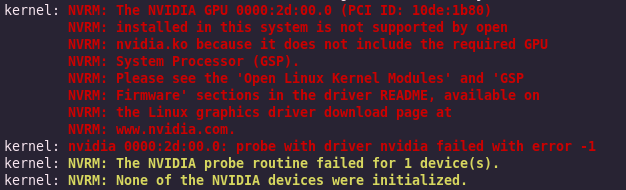
Ok, so it appears that my graphics card is now so old it's out of support, so I need to install the old drivers instead of the newest version
Found this discussion thread, I'm going to try this
https://discussion.fedoraproject.org/t/after-install-fedora-44-nvidia-drivers-failed-to-load-and-it-falled-back-to-nouveau/189884/16
Ok, I've restarted, it's still not running the nvidia drivers, looks like the nouveau drivers still grabs the GPU first, even though I think I've disabled the nouveau driver
I'm listening to the matrix soundtrack while doing this, Really adds to the tension
Ok, so I've attempted to disable the nouveau driver another way now, time to reboot
It worked!
For some reason the nouveau driver still loads but I set the option modeset=0 on it and now it doesn't grab the GPU, and then the nvidia drivers load
Ok, time to check if virtualbox still works
Virtualbox still works, nice
Ok, then I think I'm done

@quirk best would be to try to boot in single user mode or something like that post install.
Then either reinstall the driver from the command line, or start the gui from there see if it still complains for more pointers.
@mxfraud I ssh:ed from another computer and attempted to fix the graphics drivers, but checking the logs it turned out that I had another issue. The gnome display manager failed to start due to misconfiguration, the steps in this guide resolved the issue:
@mxfraud Turned out the fallback graphics was working the whole time

My current theory is graphics driver issue, cause that's been the issue every time I've upgraded